|
Dear colleagues, the April issue from the IT department is for your attention. You can find this issue, as well as all previous ones, on our website.
|
|
|
| What's New |
| To bring order to the Agent database and obtain adequate statistics, we are expanding the functionality of the Overseas Agents section, Agent Statistics reports, and even Deals. Agent announcements in the Holding offices will be of great help to all of us - to do this, simply check the Overseas Agent box for the Vendor with whom you already cooperate or met at the exhibition. |
On the topic of automating the formation of transport documents with GTI: an experimental ability to recognize and extract data from scans of bills of lading in agreements has been added, we are currently working on secure PDFs. We continue to process the sent samples and print out the maximum information from agreements/invoices.
In addition, the program has learned to transfer data to Google Sheets and now when creating, for example, a booking, data from GTI automatically appears in your operational table. |
|
|
|
|
|
We are working on a system for automatic contract generation, the goal of which is to facilitate the work of managers and lawyers when preparing standard contracts. The manager enters a minimum of data - the tool by itself collects details, fills in the template and issues a finished file.
|
|
|
|
We continue to work on improving the Formag website: we add interface languages according to the countries of our presence, configure the routing of requests coming to the site, enable protection against bots (Captcha), and more.
|
|
|
|
|
|
If you plan to use your colleague's help with transportation, simply add him/her to the agreement as an assistant. He/she will immediately have direct access to this agreement with editing rights and at the same time the opportunity to participate in the distribution of bonuses.
|
|
|
|
|
|
Keyboard shortcuts for better productivity:
Ctrl + C - copy selected text or file;
Ctrl + V - paste the text you just copied while preserving the text formatting;
Ctrl + Shift + V - paste the copied text without formatting;
Win + V - open the "Clipboard", which contains a list of previously copied text;
Ctrl + X - cut the selected item;
Ctrl + Z - undo the last action;
Ctrl + Y - redo the action you just undone;
Ctrl + F - open the search tool, which allows you to search for specific words or phrases;
Ctrl + A - select every item in the window or text in the document;
Ctrl + S - save your work;
Ctrl + Backspace - Delete the previous word;
Ctrl + Delete - Delete the next word.
|
|
|
|
|
|
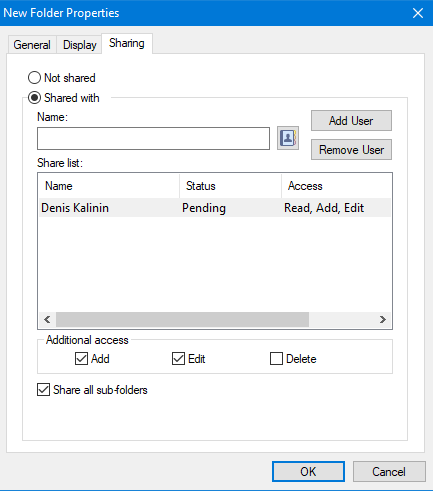
If you want to collaborate with colleagues, but for this you need them to see some of your emails in the mail, it is not necessary to forward such emails or provide access to your mailbox. You can create a folder in your GroupWise, move the necessary emails there and provide access to this folder to your colleagues. To do this, right-click on the Cabinet, select New Folder and give the new folder a name. On the created folder, right-click -> Sharing…, Shared with -> select from the address book your colleagues with whom you want to share this folder. Then, click on the selected colleagues and mark the rights to the folder (Add/Edit/Delete) and click OK. Your colleagues will receive an invitation letter to connect the folder to themselves. After consent, it will appear in their mailbox.
|
|
|
|
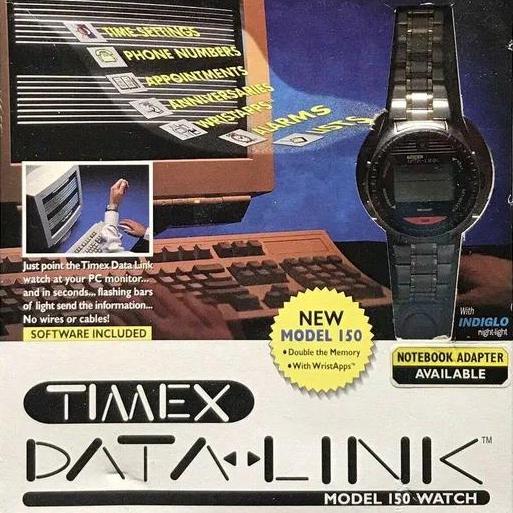
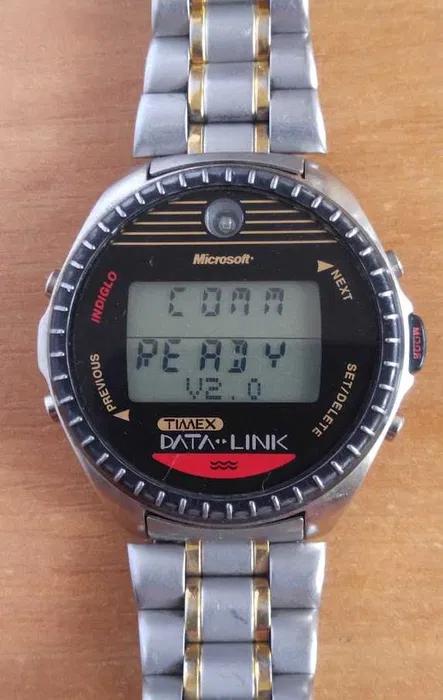
Did you know that Microsoft released a smartwatch back in 1994?
|
|
|
|
|
|
Microsoft, together with the manufacturer Timex, released the Datalink 150 model.
It was a wrist-worn alternative to the bulky PDAs of the time.
The watch contained up to 150 phone numbers, meetings reminder, had a built-in notepad and even a clone of the Space Invaders game.
To synchronize with a PC, an optical sensor was built into the watch.
The user brought the watch to the monitor, a special program on Windows made the screen flicker with black and white stripes, and the watch "read" this black and white signal, downloading data into its memory without any wires or Bluetooth.
This model was even certified by NASA and used by astronauts on the ISS!
|
|
|
|
|
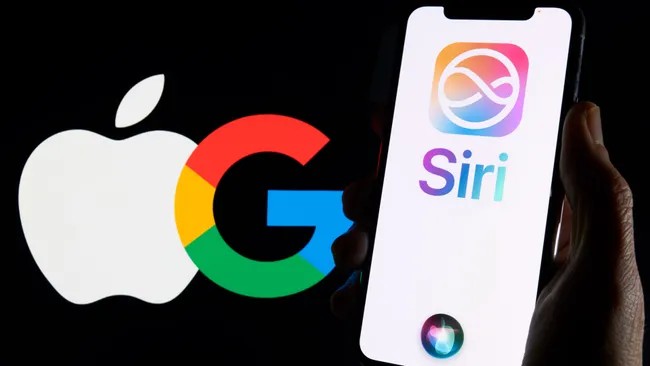
Apple and Google have joined forces to integrate Gemini artificial intelligence into the updated Siri. The voice assistant will work in a hybrid mode: simple tasks will be processed directly on the iPhone, and complex requests will be sent to Apple's secure cloud (Private Cloud Compute). This approach guarantees high speed and complete privacy, as users' personal data will not be stored on Google servers.
|
|
|
|
With Gemini technologies, Siri will become an intelligent AI assistant capable of connecting information from different applications and performing complex multi-step commands (for example, independently collecting photos from a trip and sending them to colleagues). This partnership will be a new stage in the cooperation of the companies, which already have a multi-year and extremely profitable financial agreement: Google pays Apple about $ 20 billion annually (36% of revenue from special advertising) to remain the default search engine in the Safari browser.
|
|
|
|
|
|
|
For Apple, this move is an opportunity to instantly enhance its devices with advanced AI features without developing its own giant models, while Google gets direct access with its neural networks to hundreds of millions of iPhones around the world.
|
|
|
|
|
Would you like your data stored in Earth orbit?
With artificial intelligence systems’ growing appetite for electricity, Google seems to have decided that Earth’s resources are not enough for its ambitions, and has begun talks with SpaceX about placing data centers directly in Earth orbit.
This is not just another fantasy about the distant future, but a very concrete plan. Prototype satellites under the Project Suncatcher initiative could appear as early as 2027. The logic is simple: move computing power beyond the atmosphere, where solar energy is more accessible, and local residents will not picket the construction due to the noise of cooling systems or excessive water consumption.
|
|
|
|
|
This digest was prepared for you by the GTI IT team.
|
|
|
|
|